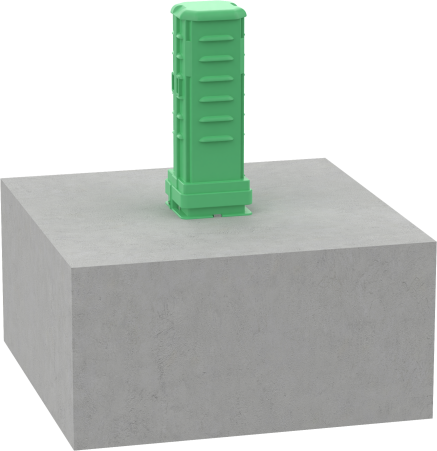
Standing alongside the road with similar appearance to a mailbox, an FTTH pedestal has complete different purpose. It brings together selected fiber splices and distribution connections above ground. Its defining feature is the combination of protection and accessibility: an outdoor enclosure that technicians can open to install, inspect and maintain the connections inside. Beneath the removable cover, dedicated areas for splicing, connector access and fiber storage keep different tasks organized rather than crowded into one space. That makes the pedestal more than a protective shell – but a space ready for the next maintenance visit.
WHERE IS IT?
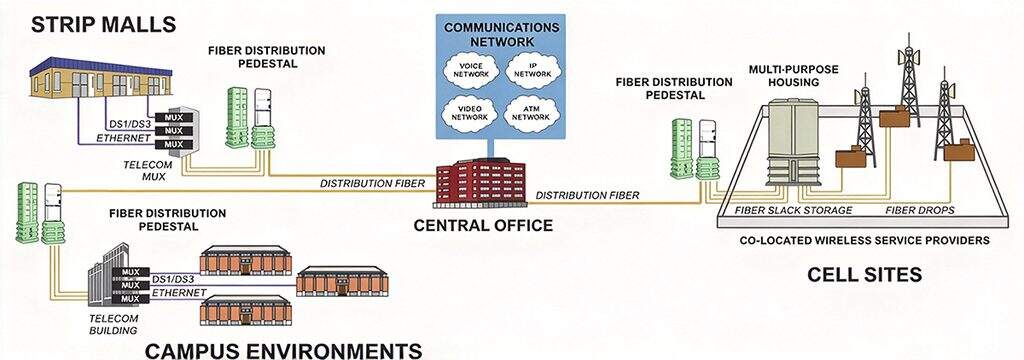
In a typical FTTH network, a pedestal serves the transition between the neighborhood distribution cable and the drop cables. Inside the pedestal, splice trays or a connectorized terminal connect selected distribution fibers to those customer drops. The distribution cable may also loop through the pedestal and continue to other connection points, rather than terminate entirely at that location. In a distributed-split network, it may house a local splitter itself. The FTTH pedestal’s position is therefore best understood by the cables and components it accommodates.
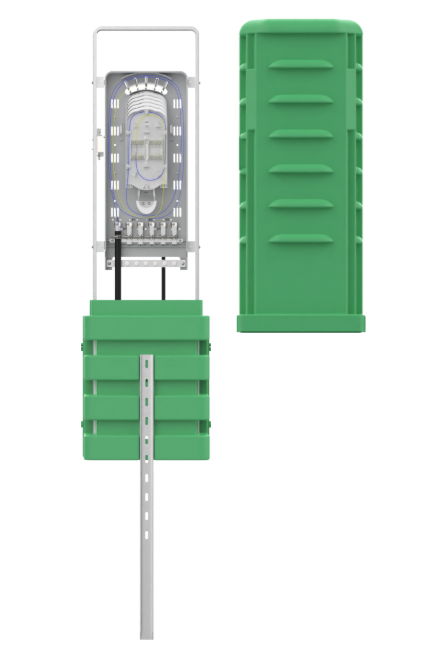
The structure is straightforward. It is a removable HDPE upper cover fits over a PP lower base, and accommodates cable entry from below. Inside, a coated metal mounting frame supports stacked splice trays or, in an alternative configuration, a fiber distribution box for terminating and connecting fibers. Cable clamps and strength-member fixing points secure incoming cables, while protective sleeves guide fibers toward the trays and a grounding bus-bar provides a connection point for bonding applicable metallic components. A mechanical hexagonal lock secures the cover to the base, helping restrict unauthorized access without making the enclosure theft-proof. Once the cover is removed, technicians can work from both sides, with dedicated areas for splicing, adapter connections and cable storage keeping the internal layout organized and accessible.
HOW TO SELECT
When it comes to pedestal selection, its internal equipment, cable routing and mounting arrangement should match maintenance requirements. Five practical checks could help narrow the space of choice:
- Connection Capacity: Specify splice capacity and customer connection ports separately, with allowance for planned expansion; a pedestal’s maximum fiber count does not automatically equal the number of homes it can serve.
- Cable Compatibility: Confirm that the mounting arrangement accommodates the intended splice trays or terminal box, while cable entries, clamps and storage space suit the incoming and outgoing cables without compromising minimum bend-radius requirements.
- Protection: Match water and dust protection, operating temperature, UV resistance and impact requirements to the site, checking the outer enclosure and any internal terminal separately; an IP54 enclosure should not be treated as providing immersion protection.
- Installation: Check the foundation or burial arrangement, mounting dimensions, conduit routes and grounding provisions; a split base can simplify cable placement, but it does not eliminate the need for suitable anchoring and site preparation.
- Maintenance: Assess whether technicians can reach trays and connectors, manage spare fiber and re-secure the cover after servicing; also confirm that the supplied configuration has matching installation instructions and an accessible technical-support contact.
CQT‘S PEDESTAL
CQT’s GPJ09-JZ-09 Pedestal combines an above-ground connection point with features designed around cable placement, organized fiber management and maintenance access. It has a maximum splice capacity of 144 fibers and an eight-adapter configuration, with the internal equipment and supplied components to be confirmed for the selected arrangement. Key product features include:
- Split base for cable placement: The detachable lower base facilitates cable entry and routing, giving installers greater flexibility when positioning the pedestal around incoming cables.
- Snap-in mounting bracket: A snap-fit structure simplifies bracket assembly by replacing conventional bolted attachment at that interface; foundation anchoring and other installation tasks still require the appropriate tools.
- Organized layout with two-sided access: Dedicated splicing, adapter and cable-management areas separate different tasks, while removing the upper cover allows technicians to approach the internal assembly from both sides.
- Lockable, serviceable construction: A mechanical hex-key lock secures the removable cover, while cable clamps, strength-member fixing points and a grounding busbar support cable retention and applicable bonding requirements.
- Defined outdoor performance: An HDPE upper cover, PP base and electrostatically coated metal internal components form the enclosure structure; the specification lists IP54 protection, IK08 impact resistance and a −40 to +65°C operating range for assessment against project conditions.
AFTERWARDS
Beyond the standard configuration, CQT offers OEM/ODM customization for project-specific requirements, including branding, labeling, packaging, internal component arrangements and selected structural changes, with the scope for each pedestal confirmed through technical review. The agreed supply package should also identify the required splice trays or terminal box, adapters, cable clamps, protective sleeves and mounting hardware, so installers know what is included and what must be prepared separately. For installation and subsequent maintenance, CQT provides product guidance and technical assistance, including remote troubleshooting for overseas projects. Where a product quality issue is confirmed, replacement parts or other remedies can be arranged according to the applicable warranty and contract terms, with replacement guidance where site conditions permit. Contact CQT to discuss your pedestal configuration, accessory package and after-sales requirements—before the first installation and with the next maintenance visit in mind.